User guide
Sonzoy is a robot that trades for you on eToro. You give it a budget and some rules. It watches the markets, opens and closes trades within those rules, and shows you exactly what it did and why. It can make money and it can lose money. Start on a demo account (practice money) and switch to real money only once you understand what it is doing.
Screens show sample data. Numbers in orange circles match the numbered notes under each picture.
1. Sign in and connect eToro
Two minutes of setup before anything happens.
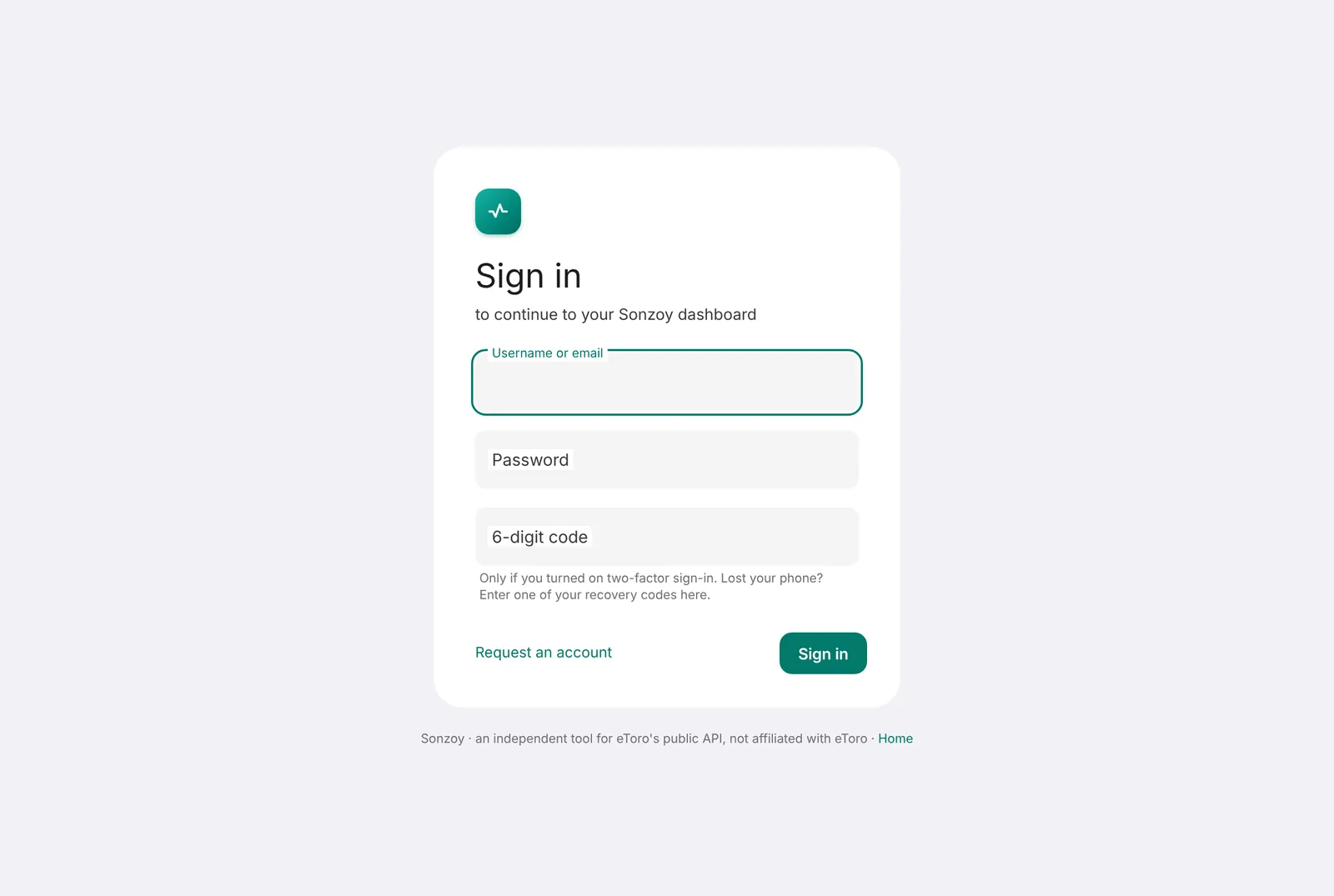
- Sign in with your username and password, or press Sign in with Google and pick the Gmail address of your account. Turn on two-factor sign-in later (see Security).
- In eToro, create an API key at api-portal.etoro.com (Settings → Trading → API Key Management). Choose a demo key first.
- In Sonzoy, open Settings → Connection, paste the two keys and press Save and test connection.
- Leave Account on Demo. Real money needs extra steps on purpose (type REAL, two-factor code).
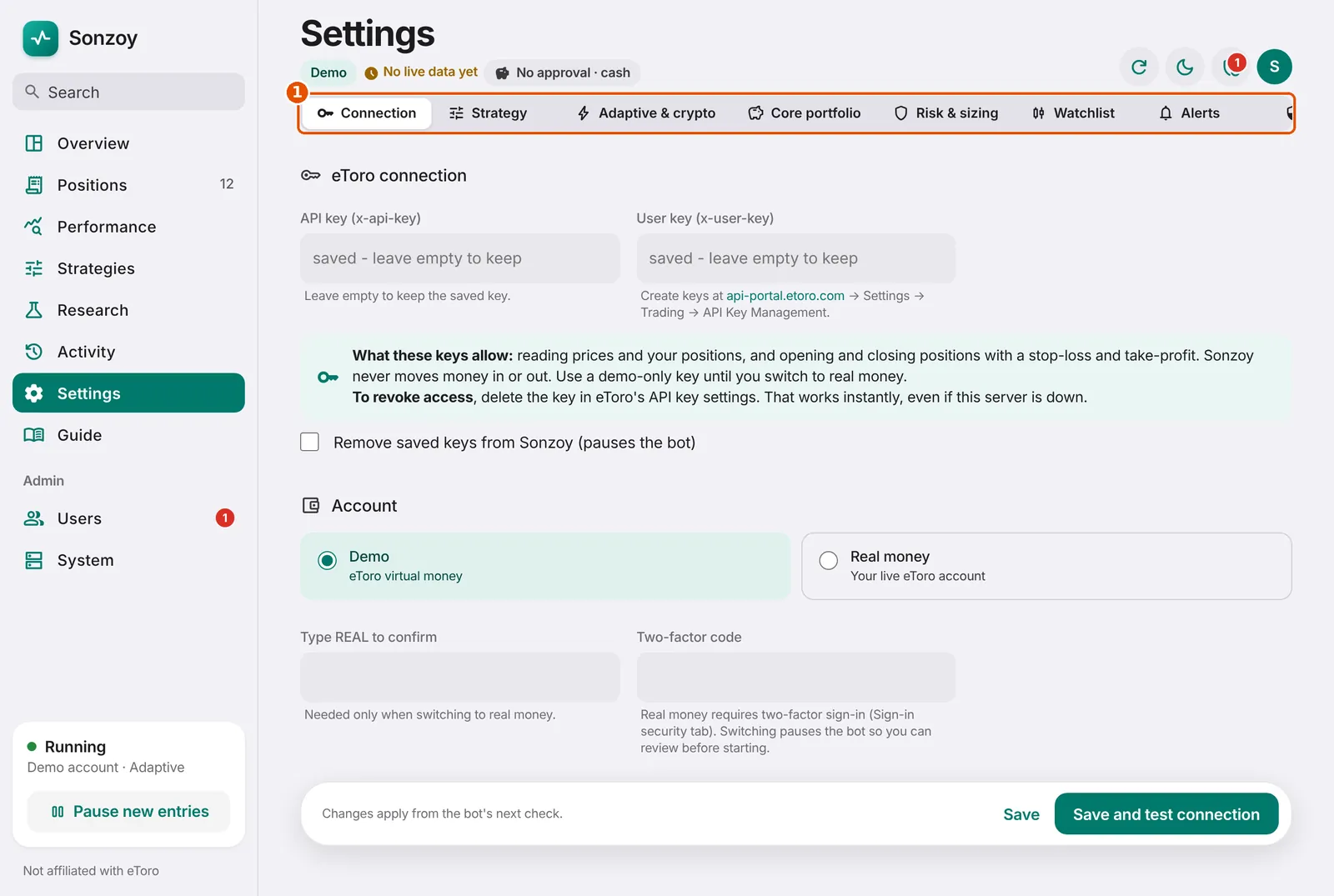
- The settings tabs: Connection, Strategy, Adaptive & crypto, Core portfolio, Risk & sizing, Watchlist, Alerts, Sign-in security.
Good to know: Sonzoy never asks for your eToro password. The keys are stored encrypted and you can delete them any time.
2. The Overview screen
Your home screen. One look tells you whether everything is fine.
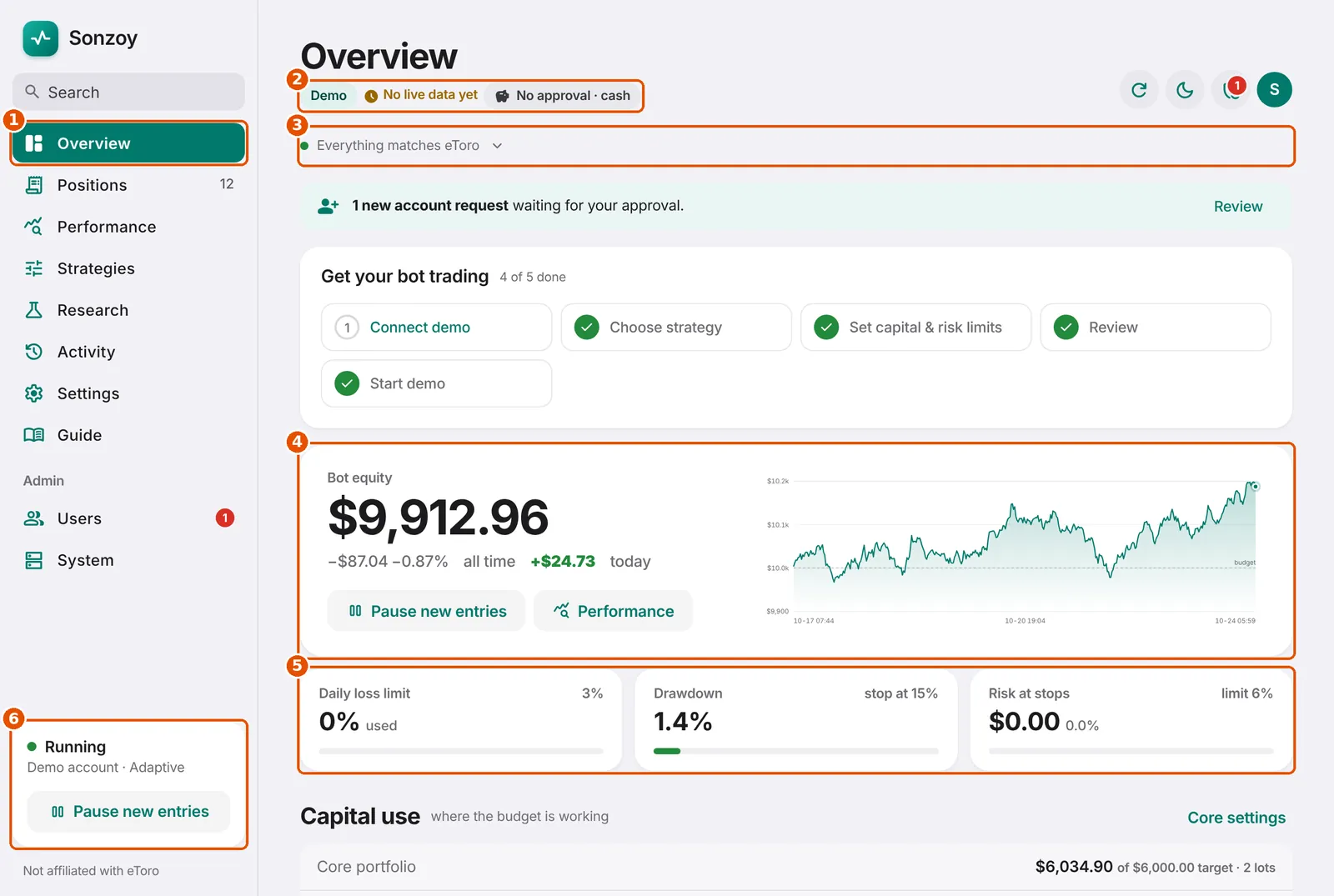
- The menu. Positions, Performance, Research and Settings are one click away.
- Status badges: Demo or Live money, how fresh the prices are, and what is allowed to trade right now.
- The health line. Green 'Everything matches eToro' means Sonzoy and eToro agree on every position. Tap it for details.
- Bot equity: your budget plus everything the bot has won or lost, with today's change and a chart.
- Safety gauges: how close you are to the daily loss limit, the drawdown limit and the total risk at stops.
- The bot switch. 'Pause new entries' stops new trades but keeps open ones protected by their stops.
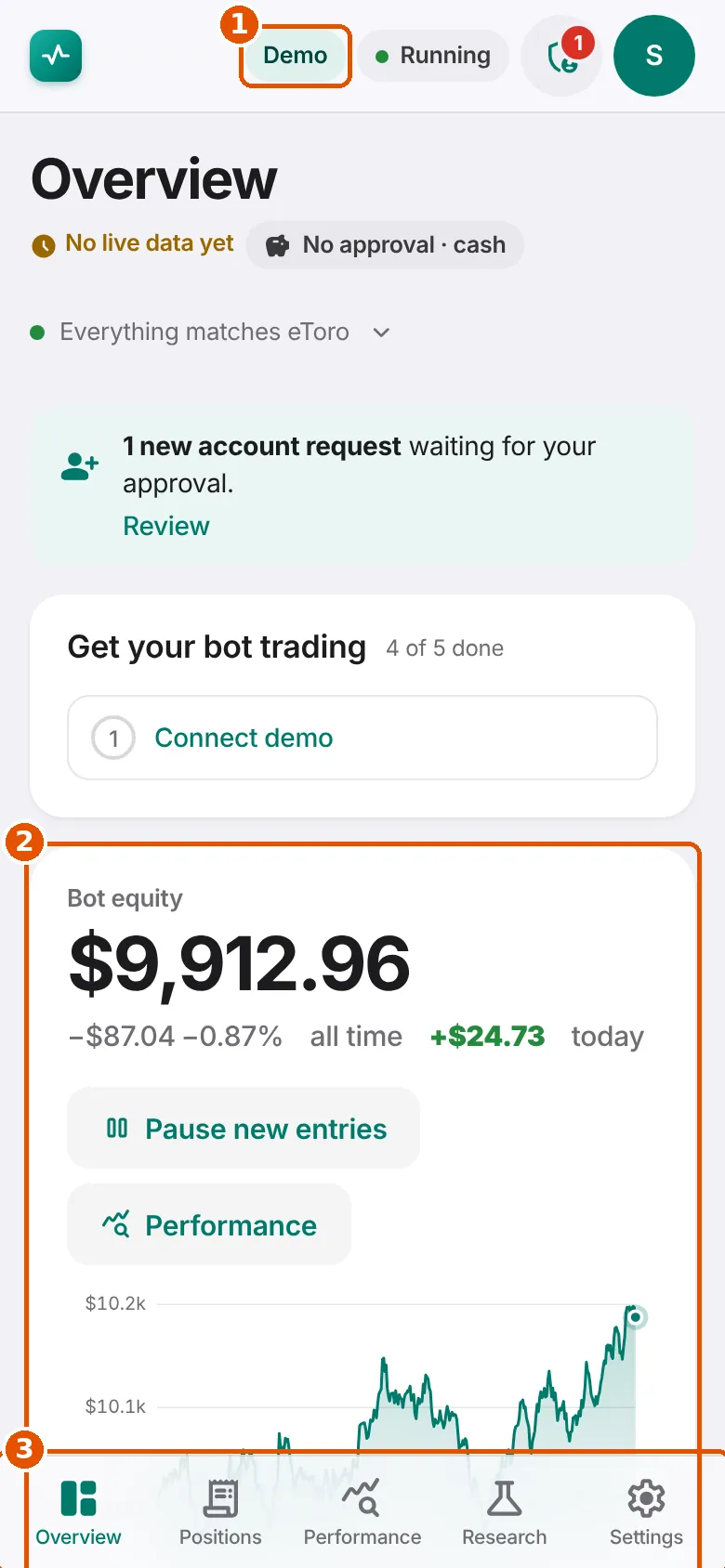
- Demo / Live badge. Always visible, so you never confuse practice money with real money.
- Bot equity and today's change.
- The tab bar: Overview, Positions, Performance, Research, Settings.
Good to know: 'No live data yet' or 'Stale' means prices have not updated recently. Figures may be out of date until they refresh.
3. Capital use and strategy approval
Where your money is working, and which markets may trade.
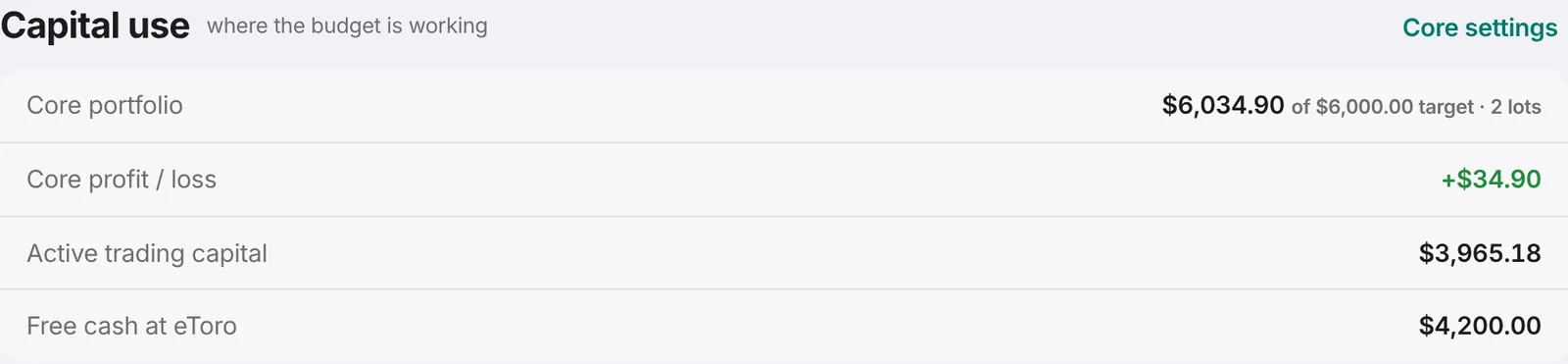
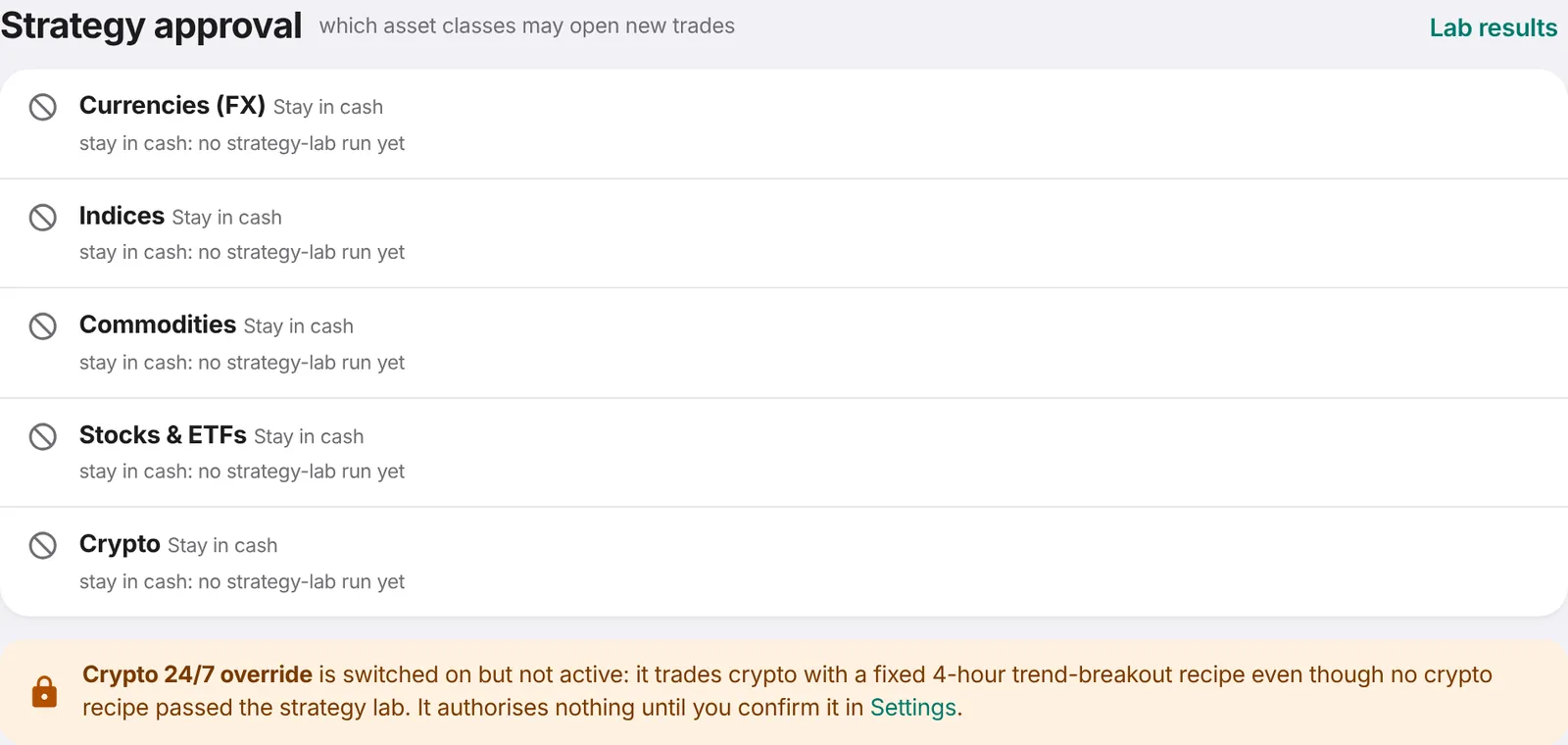
Every week the strategy lab tests recipes on eToro's own price history. A recipe may trade only if it made money on older data AND on newer data it had never seen, and won at least 55% of its trades on both.
'Stay in cash' is a normal answer. It means nothing passed the tests, so the bot does not gamble with that money.
4. Choosing how the bot trades
Settings → Strategy and Settings → Adaptive & crypto.
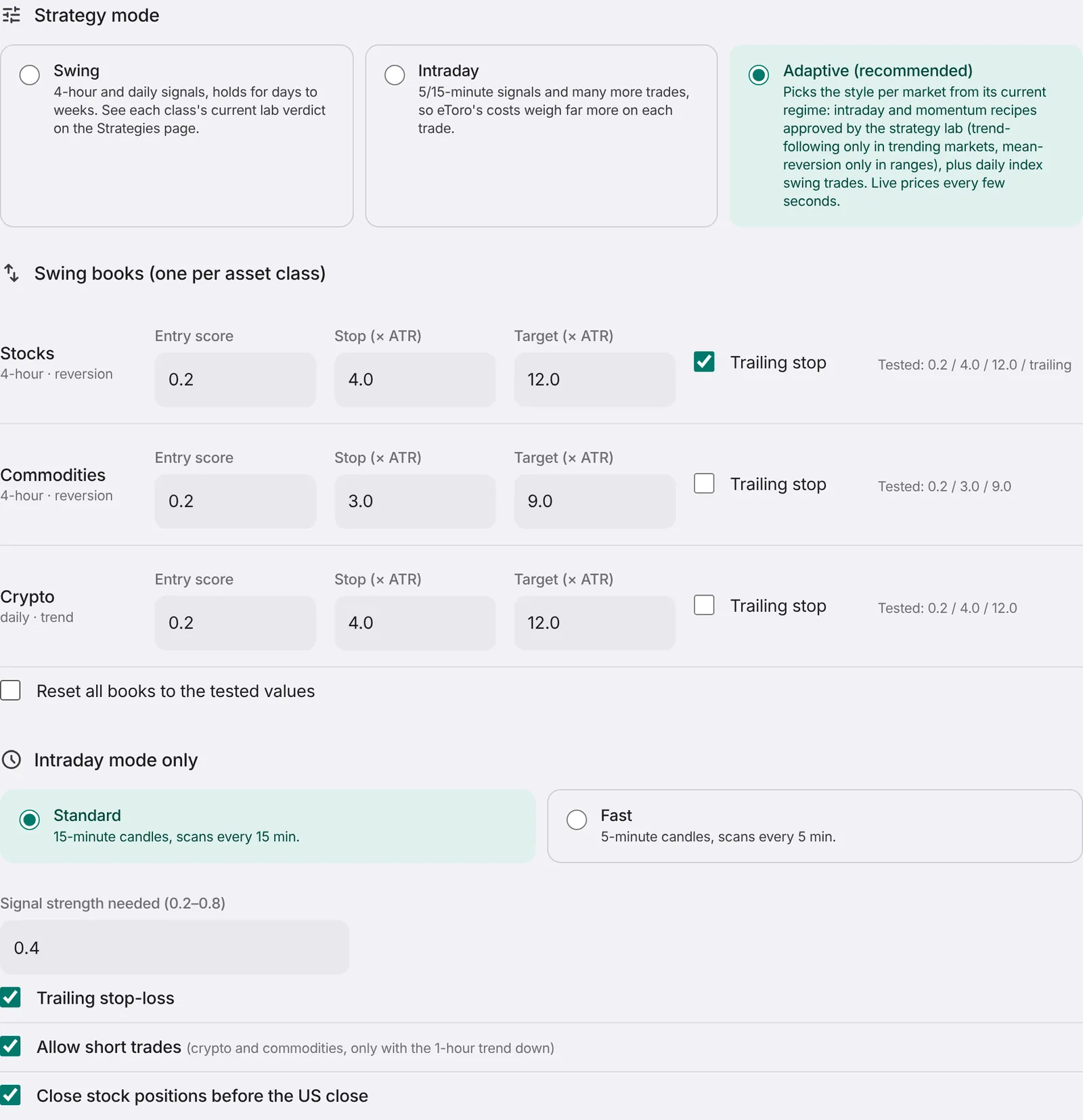
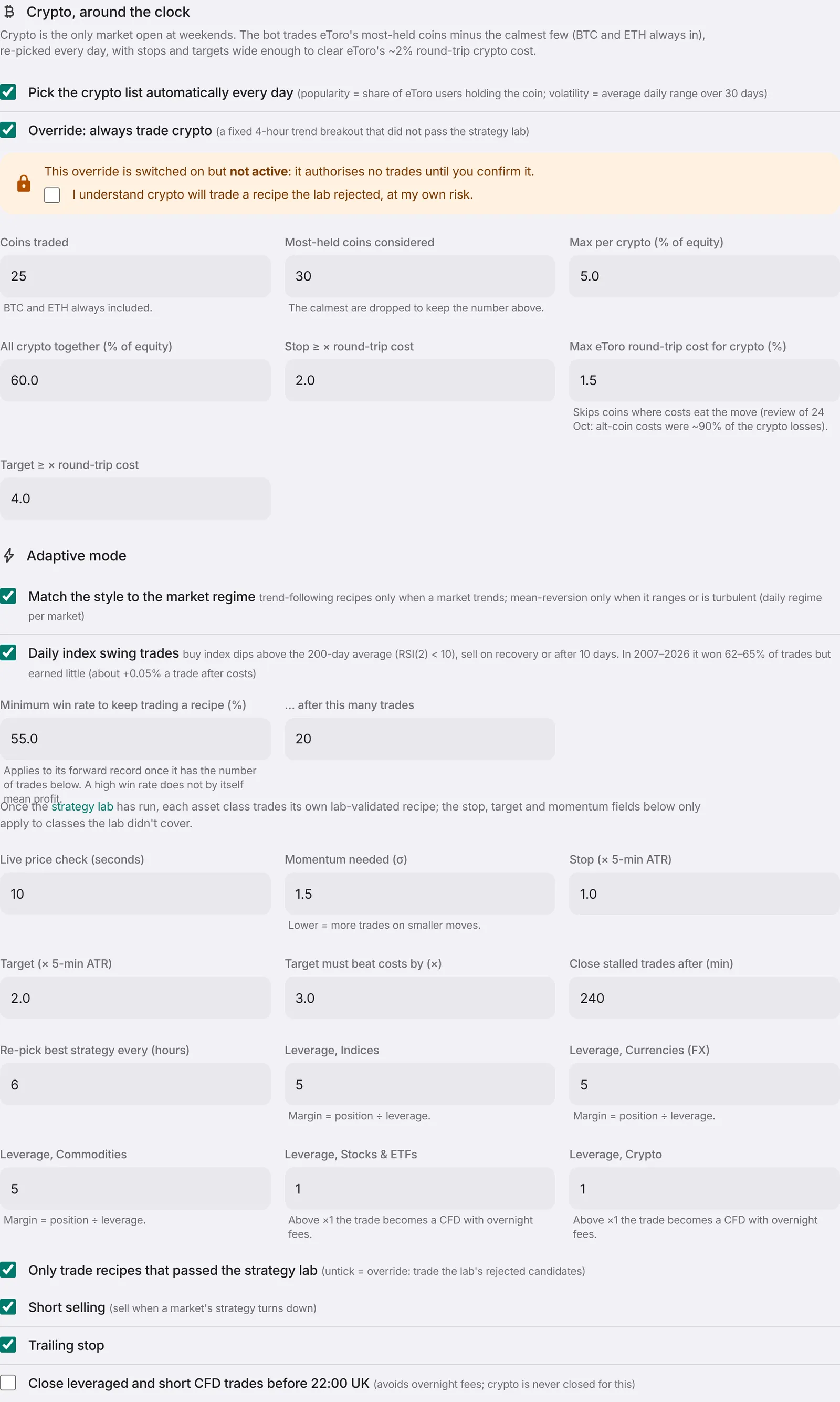
Adaptive (recommended) looks at each market every day and decides what kind of market it is:
Trending: the price is clearly going somewhere. Only trend-following recipes may trade.
Range-bound: the price goes back and forth. Only 'buy low, sell high' (mean-reversion) recipes may trade.
Turbulent: unusually wild moves. Trend-following stops; only mean-reversion may trade.
On top of that, a daily 'index swing' trade buys stock-market indices after a sharp dip in an uptrend and sells on the recovery.
Minimum win rate: a recipe whose recent record wins less than this (55% by default, after 20 trades) stops opening trades.
Good to know: A high win rate alone does not mean profit: many small wins can be wiped out by one big loss. Sonzoy checks both.
5. AI agents (TradingAgents)
A team of AI analysts that debates each market once a day.
- Get an API key from your AI provider (Anthropic, OpenAI, Google, DeepSeek or OpenRouter). You pay the provider for every analysis.
- Open Settings → AI agents. Choose the provider, paste the key and pick the markets to analyse (up to 20; the default is SPY, QQQ, NVDA, MSFT and BTC). Stocks, ETFs, crypto, currency pairs (EURUSD), indices (SPX500, NSDQ100, GER40 ...) and commodities (GOLD, OIL ...) can all be analysed. When you change the provider, paste that provider's key too: a Claude (Anthropic) key starts with sk-ant-.
- Tick the confirmation and save. Then either choose AI agents in Settings → Strategy (they use the whole budget), or keep Adaptive (or Swing) and tick 'Run the AI agents alongside' with an amount for them, so both strategies trade in the same account, each with its own money.
- On the AI agents page press Test AI connection: it sends a few tokens to both models with your key and lists the models your key can use. Analyse now runs one market straight away (it counts toward the daily limit).
- Once a weekday after the US close the analyses run. The AI agents page shows every decision, its reasoning and what the bot did with it.
The analysis comes from TradingAgents, an open-source research framework (Apache-2.0). Market, sentiment, news and fundamentals analysts write reports; a bull and a bear researcher debate them; a trader proposes a plan; a risk team and a portfolio manager end on Buy, Overweight, Hold, Underweight or Sell.
Sonzoy only acts on that rating: Buy opens a long with one risk unit, Overweight with half a unit, Sell or Underweight closes it, Hold does nothing. It never opens shorts. Every order gets a stop and a target and must pass your daily loss, drawdown, position and portfolio limits, and a position is closed after the holding period you set.
Stocks, ETFs and crypto are bought without leverage. Currency pairs, indices and commodities are CFDs at eToro and a position must be worth at least $1,000 there, so they use your leverage setting for that market class (Settings, at most what your administrator allows): the position's size still comes from your risk per trade, leverage only lowers the cash eToro holds for it. Before each order Sonzoy checks eToro's own rules for that market (minimum size, leverage on offer, whether opening is allowed) and doesn't send an order eToro would refuse; the decision then says why it wasn't traded.
AI answers vary from run to run, so this strategy can't be backtested and nobody can tell you its expected return. Judge it on demo over months, not days. It is off for real money until an admin reviews it (Admin → System).
Alongside another strategy, the AI agents size their trades, count their positions and check portfolio limits with their own amount plus their own profit or loss; the main strategy uses the rest. Neither trades a market the other holds. The daily loss limit, drawdown limit and daily trade cap cover the whole account.
Your AI key is stored encrypted, is only handed to the analysis process, and is never shown again or written to the logs.
6. Core portfolio
Put most of the budget to work in a simple, diversified ETF mix.
- Tick 'Run the core portfolio' and the confirmation below it.
- Choose a model: Balanced 60/40, Growth 80/20, or Global risk-balanced.
- Choose the share of the budget for the core (for example 80%). The rest is for active trading.
- Save. The core buys during US market hours and rebalances only when a holding drifts off target, or once a month.
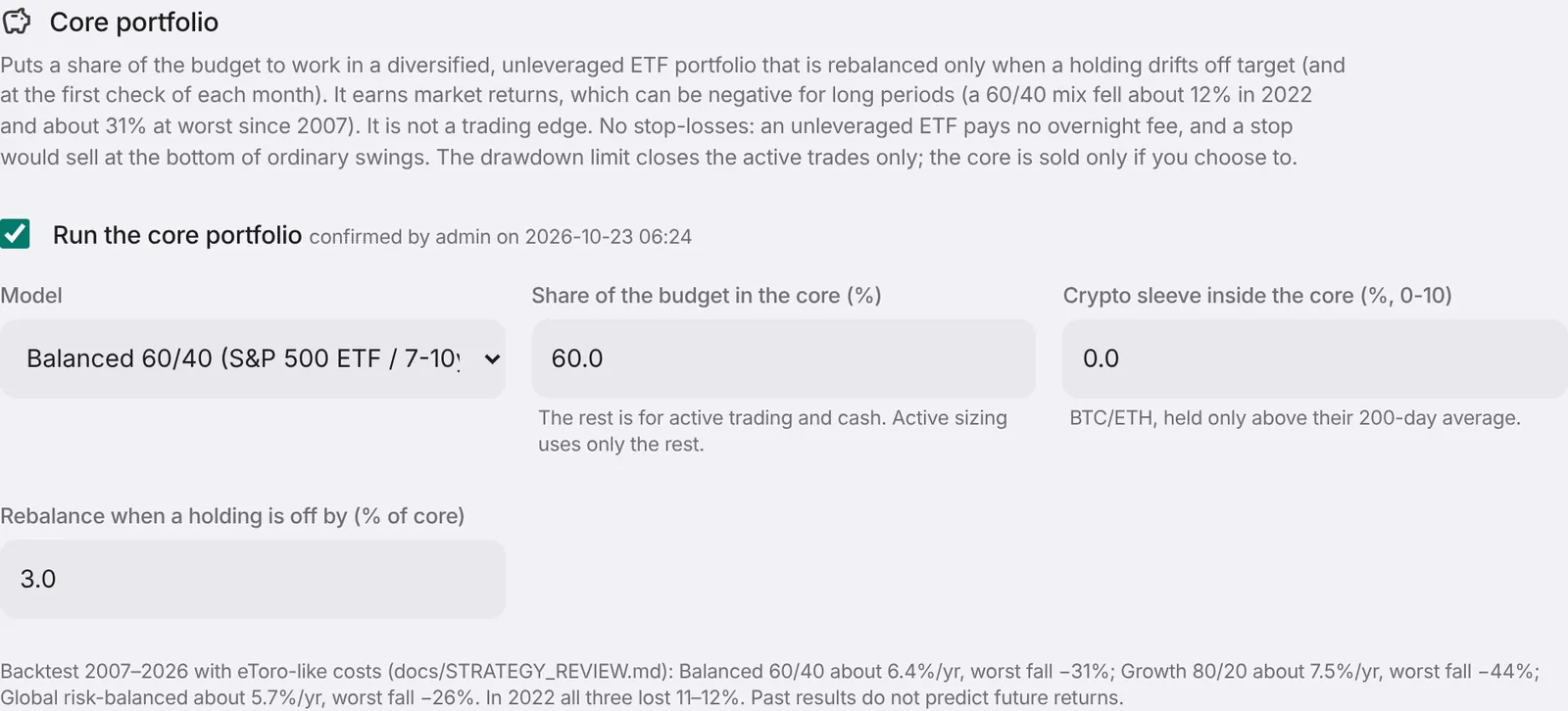
The core holds real ETFs without leverage and without stop-losses, so there is no overnight fee and no forced selling in an ordinary dip.
It earns roughly what the markets earn, which can be negative for a long time (a 60/40 mix fell about 12% in 2022).
7. Risk and sizing
The rules that keep a bad day from becoming a disaster.
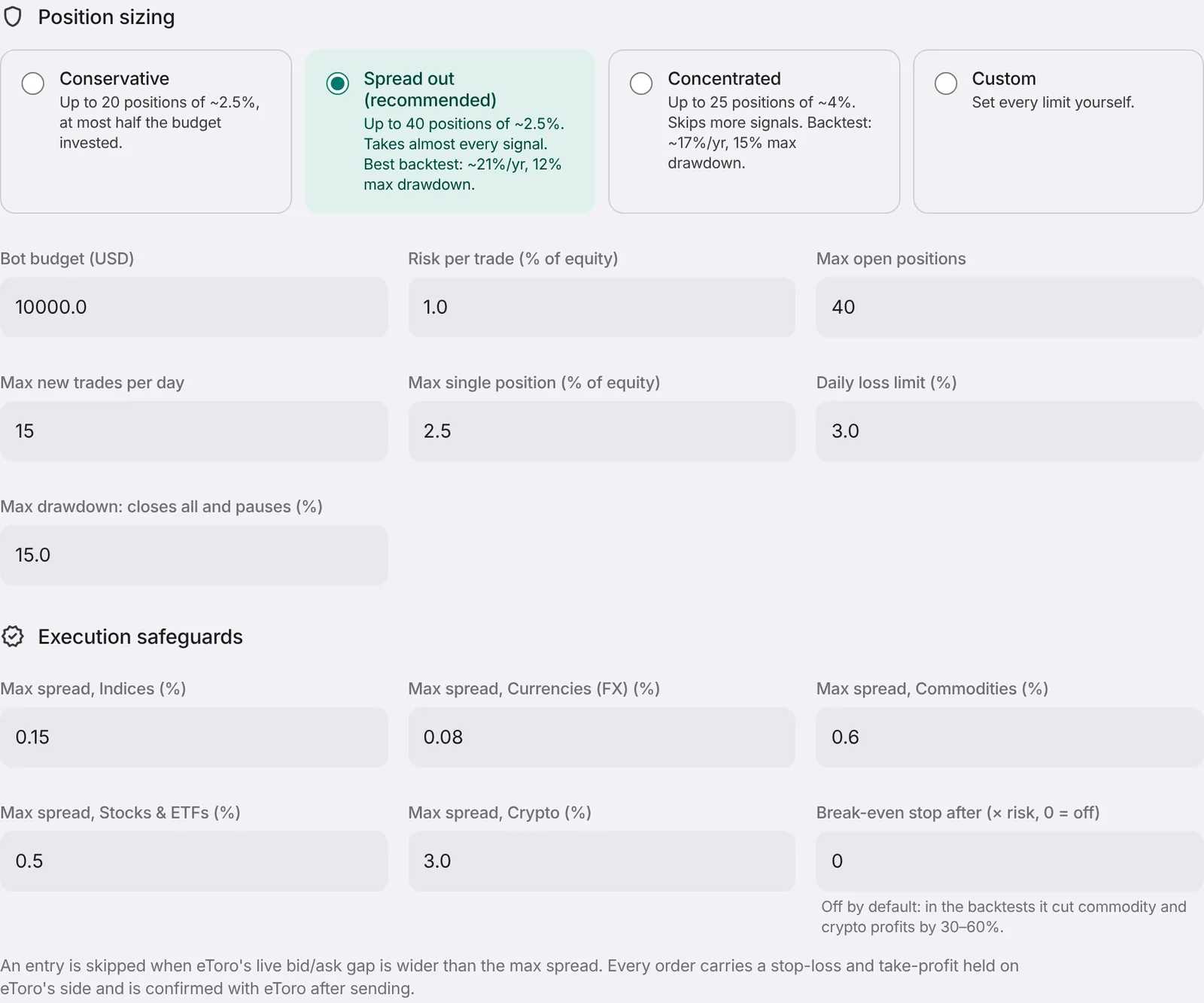
Budget: the money the bot may use, e.g. $10,000.
Risk per trade: the most one trade should lose if its stop is hit. 0.5% of $10,000 = $50.
Daily loss limit: if the bot is down this much today, it opens nothing new until tomorrow.
Max drawdown: if the bot falls this far from its best point, it closes its active trades and pauses. The core portfolio is kept.
Max spread: skips a trade when eToro's buy/sell gap is too wide (it would cost too much).
8. Starting, pausing and stopping
You are always in control.
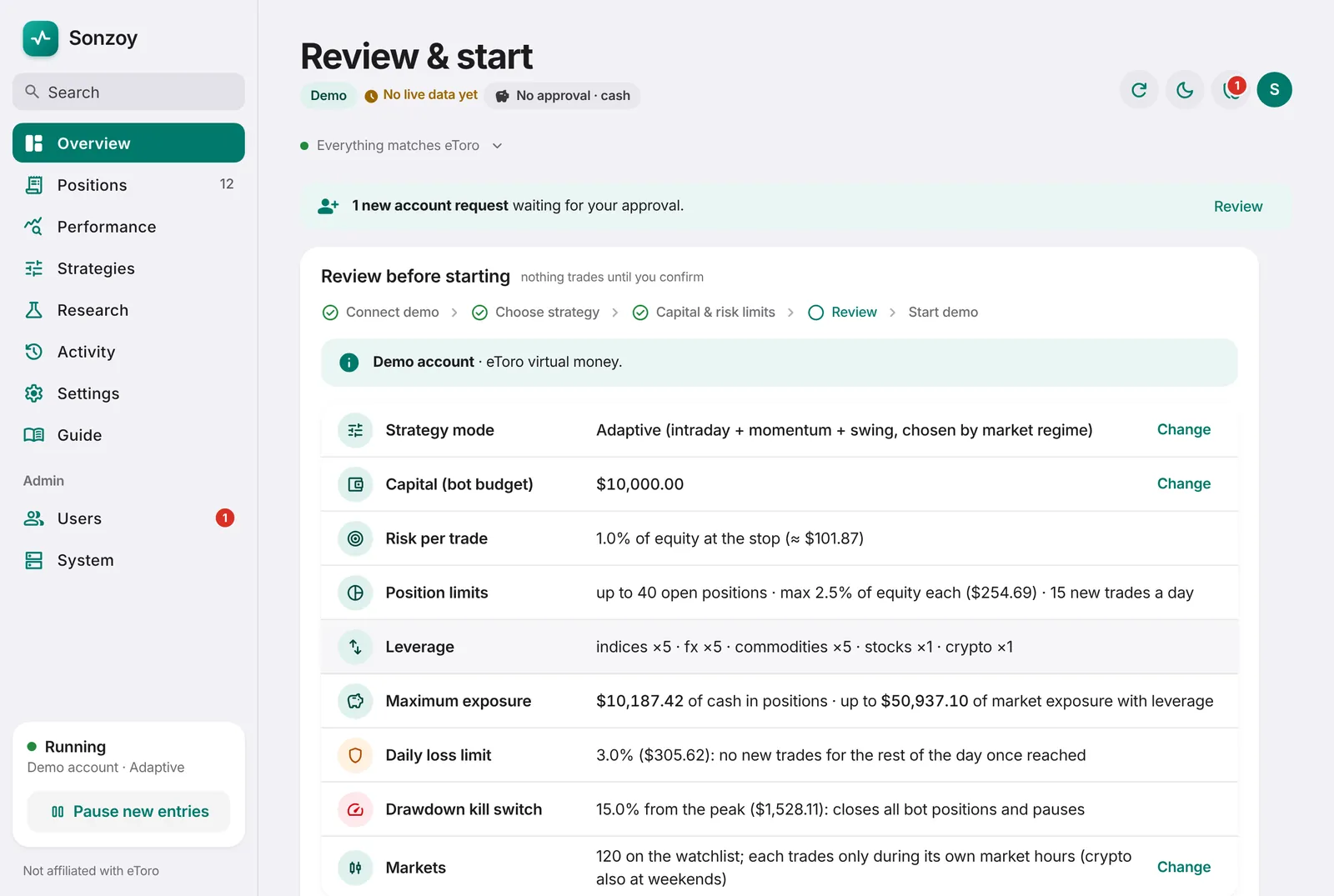
Review & start: shows every setting that matters before the bot begins.
Pause new entries: no new trades. Open trades stay open with their stops at eToro. Use this whenever you are unsure.
Close bot positions: sells the bot's active trades at market price. It asks you to type CLOSE first, and never touches trades you opened yourself.
Start fresh (Performance → Start fresh): begins a new results period under the current strategy. Profit and loss, drawdown, win rates and the scorecard restart from zero; it can close the bot's open positions first. Earlier trades are kept and can be shown under Positions → History.
Real money uses the same, latest strategy as demo automatically. You still switch an account to real money yourself (type REAL and a two-factor code).
9. Reading your positions
Positions → Open shows everything the bot holds now.
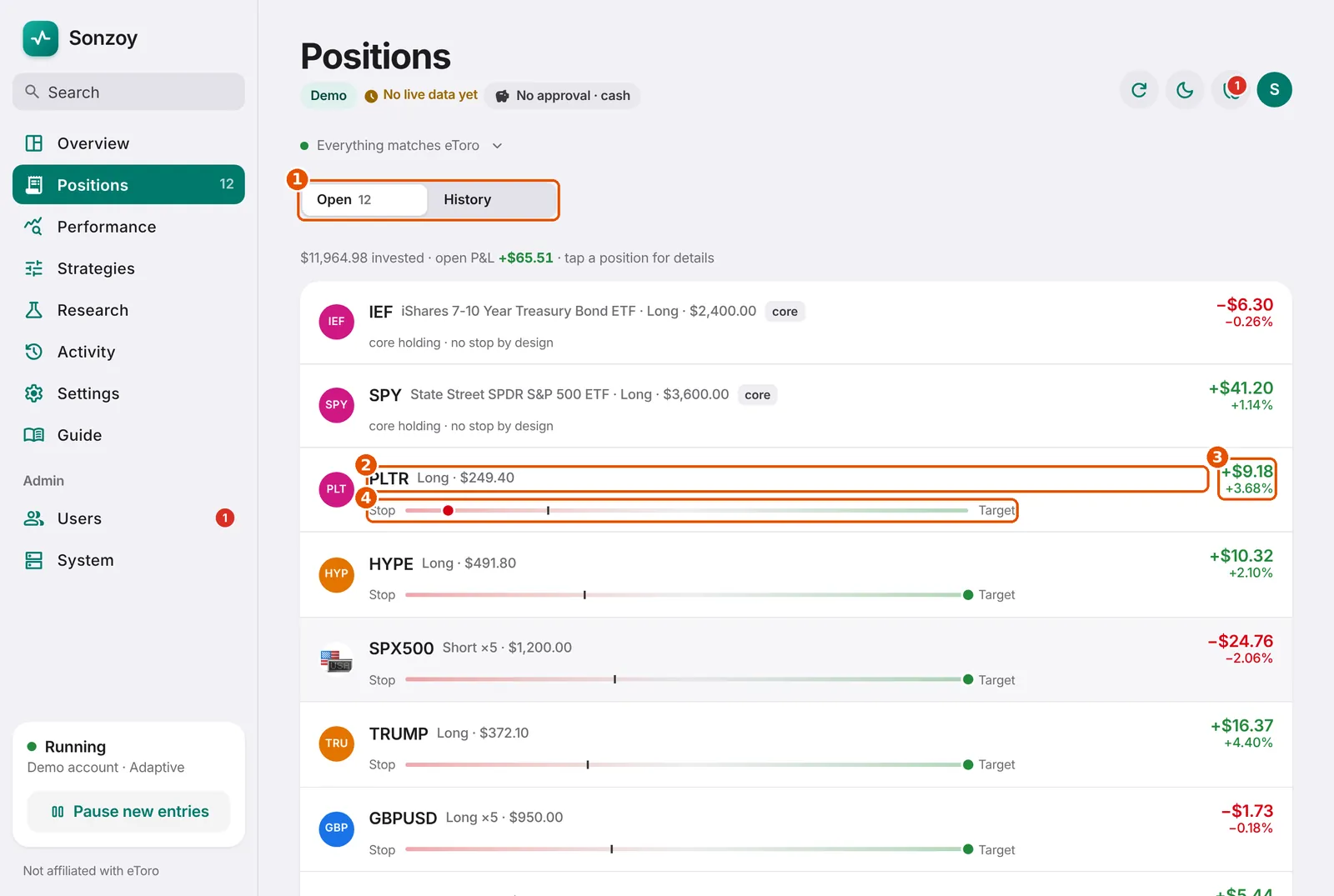
- Open / History switch. History lists every closed trade with its result.
- The market, its full name, long (expects a rise) or short (expects a fall), and the amount.
- Profit or loss right now, in dollars and percent.
- Where the price is between the stop (left) and the target (right).
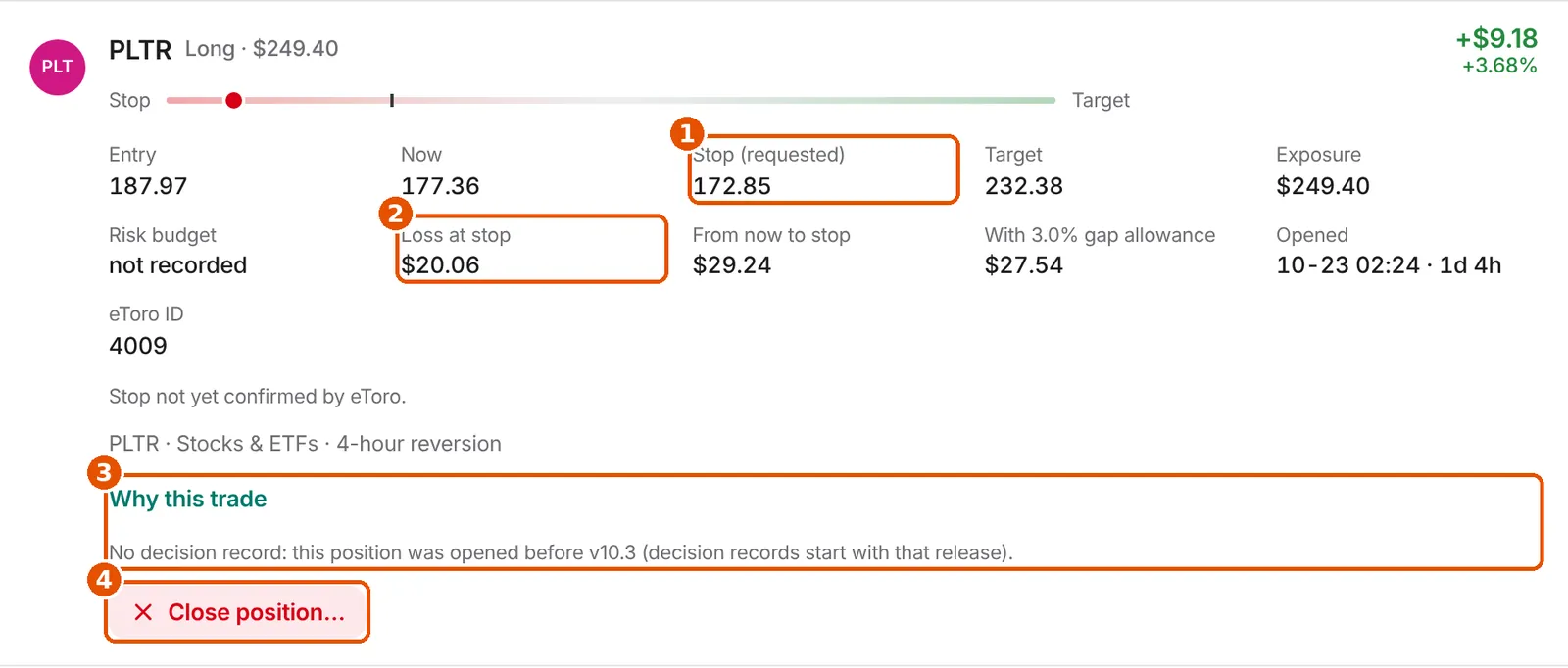
- The stop-loss: the price at which eToro closes the trade to limit the loss. 'At eToro' means eToro confirmed it.
- Loss at stop: what you would lose if the stop is hit.
- Why this trade: the full decision chain (strategy, approval, signal, size, order, fill).
- Close position…: opens a review sheet first. Nothing closes on one tap.
Good to know: If eToro keeps a wider stop than the bot asked for, the detail shows a warning, because the possible loss is bigger than planned.
10. Closing safely
Two-step closing protects you from accidental taps.
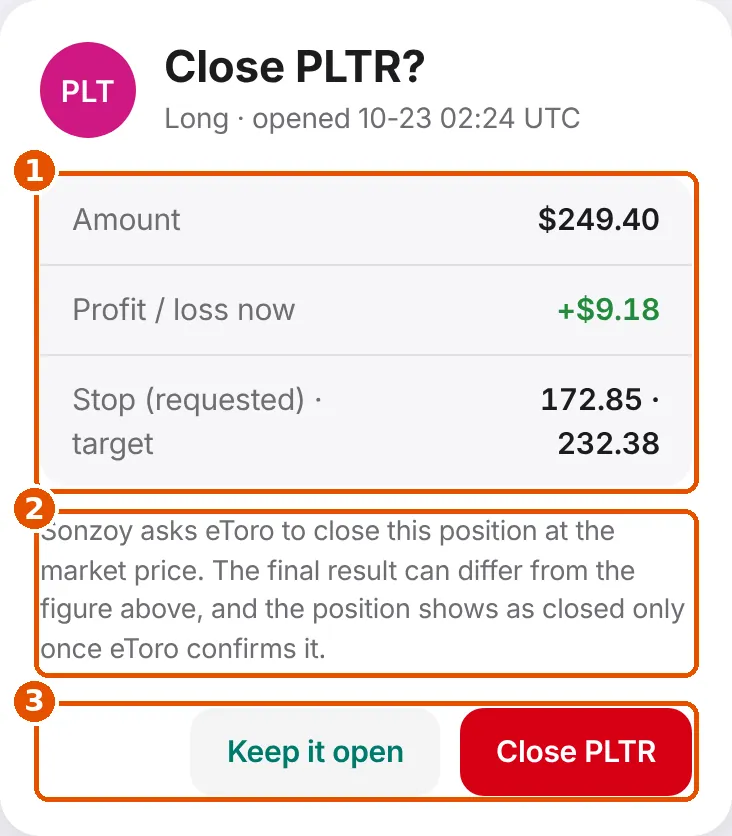
- What you are about to close and its current result.
- What happens next: eToro closes at the market price, so the final number can differ.
- 'Keep it open' cancels. The red button confirms.
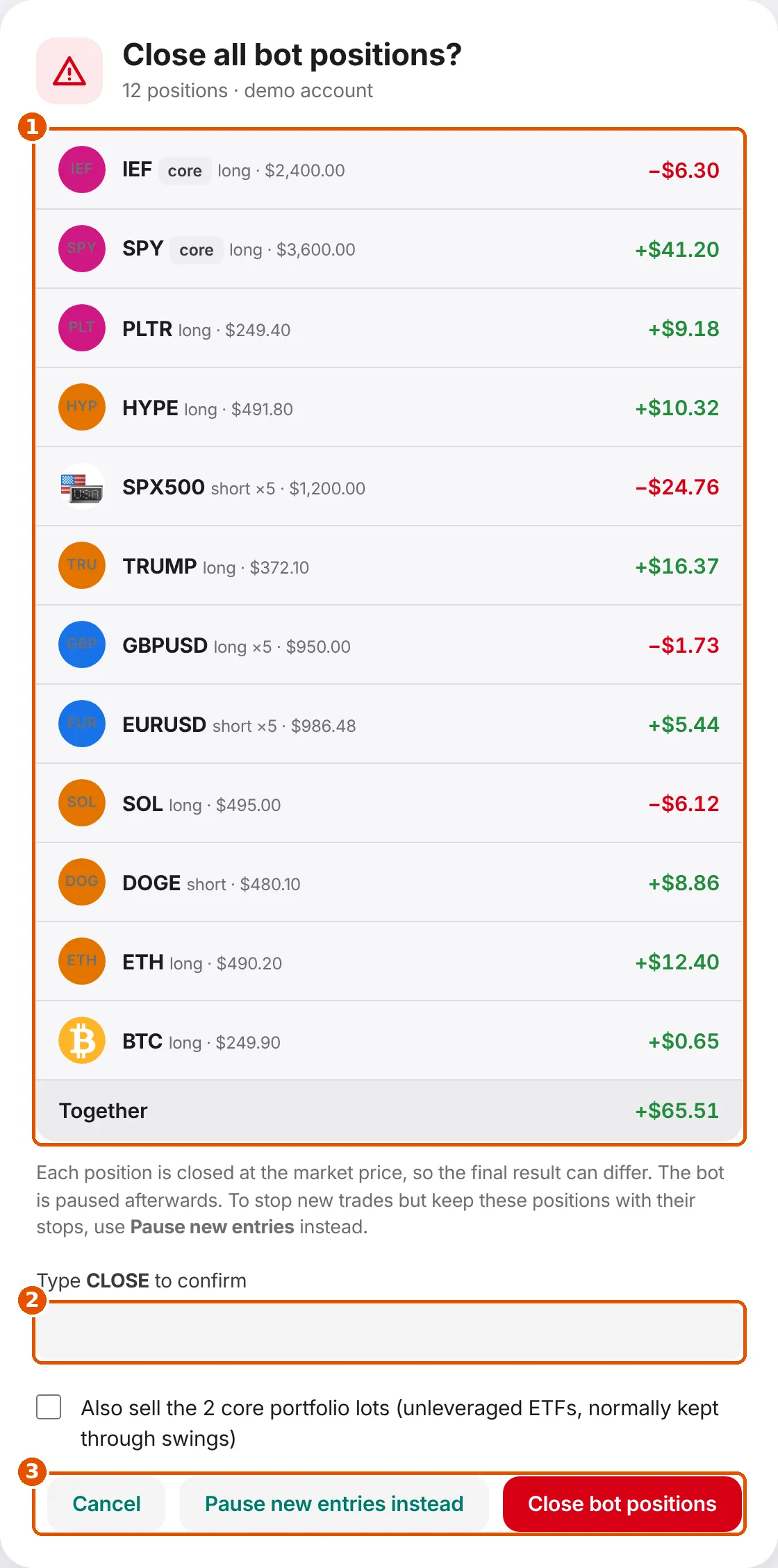
- Every bot position and the combined result.
- Type CLOSE in capital letters. Real money also asks for a two-factor code.
- 'Pause new entries instead' is the safer choice if you only want the bot to stop opening trades.
11. Performance report
Did the bot make or lose money, and why?
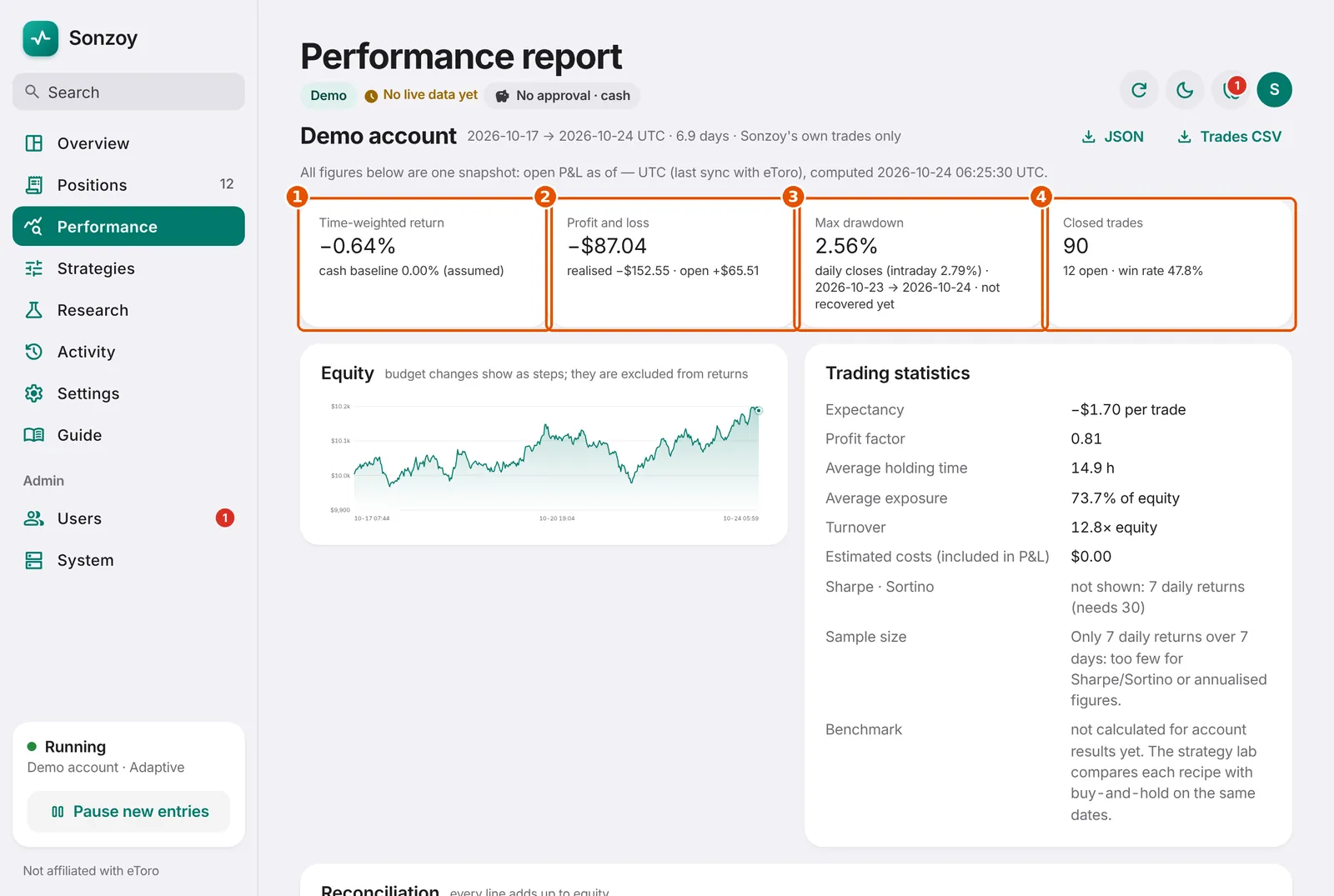
- Time-weighted return: your result in percent, ignoring money you added or removed.
- Profit and loss in dollars: closed trades (realised) plus open trades (open).
- Max drawdown: the biggest fall from a high point.
- Closed trades, open trades and win rate.
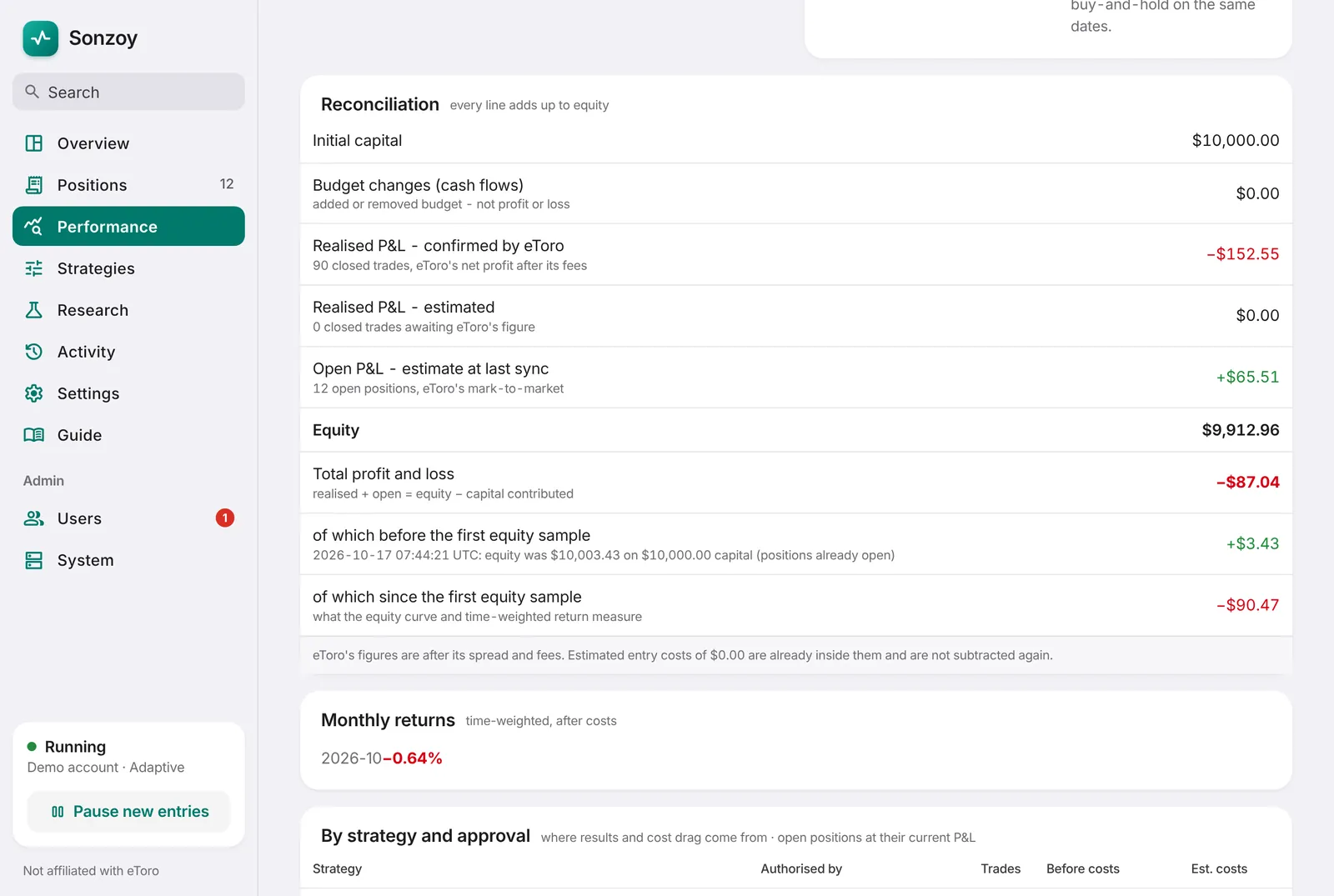
Sharpe and Sortino ratios appear only after 30 days of data; before that they are not meaningful.
'By strategy and approval' shows which strategy made or lost the money, and how much went on costs.
JSON and Trades CSV download the same figures for your own records.
12. Research
For the curious: how strategies are tested and how well orders are filled.
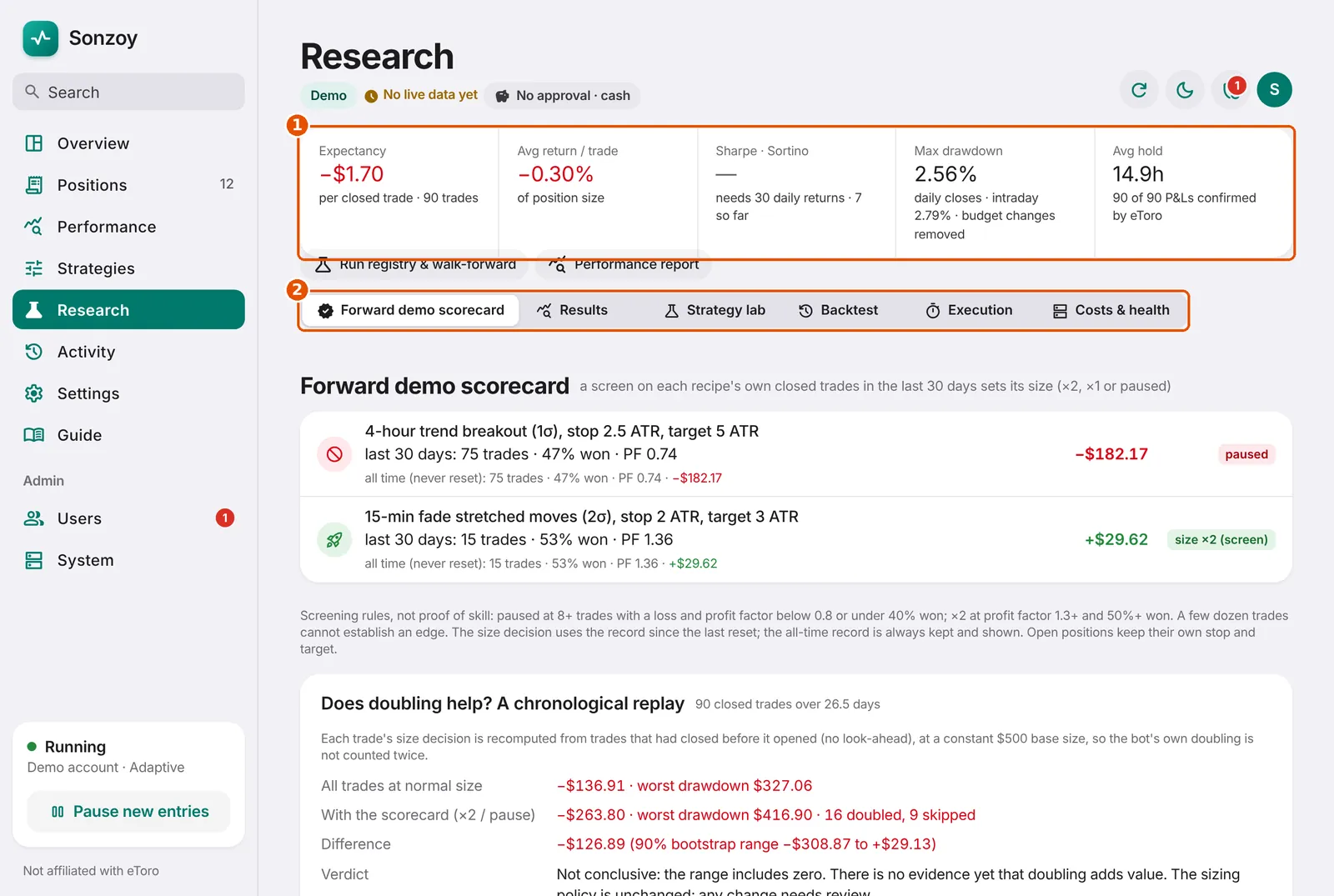
- Key statistics of closed trades.
- Tabs. 'Forward demo scorecard' is each recipe's real record on your demo account.
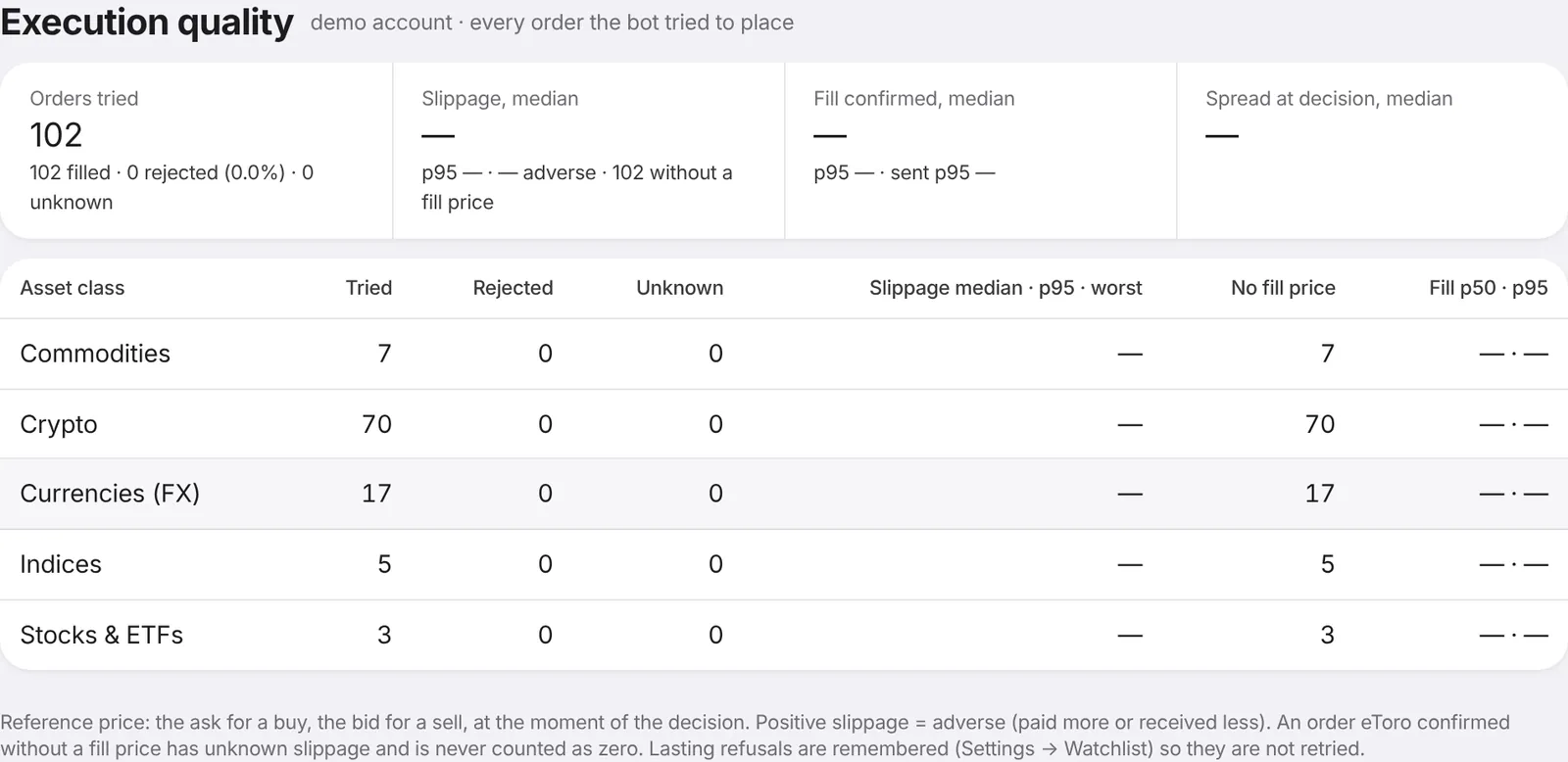
Slippage above zero means you paid a little more (or received a little less) than the quoted price.
A strategy-lab result is a candidate, not a promise. Only real demo or live trades show how a strategy actually does.
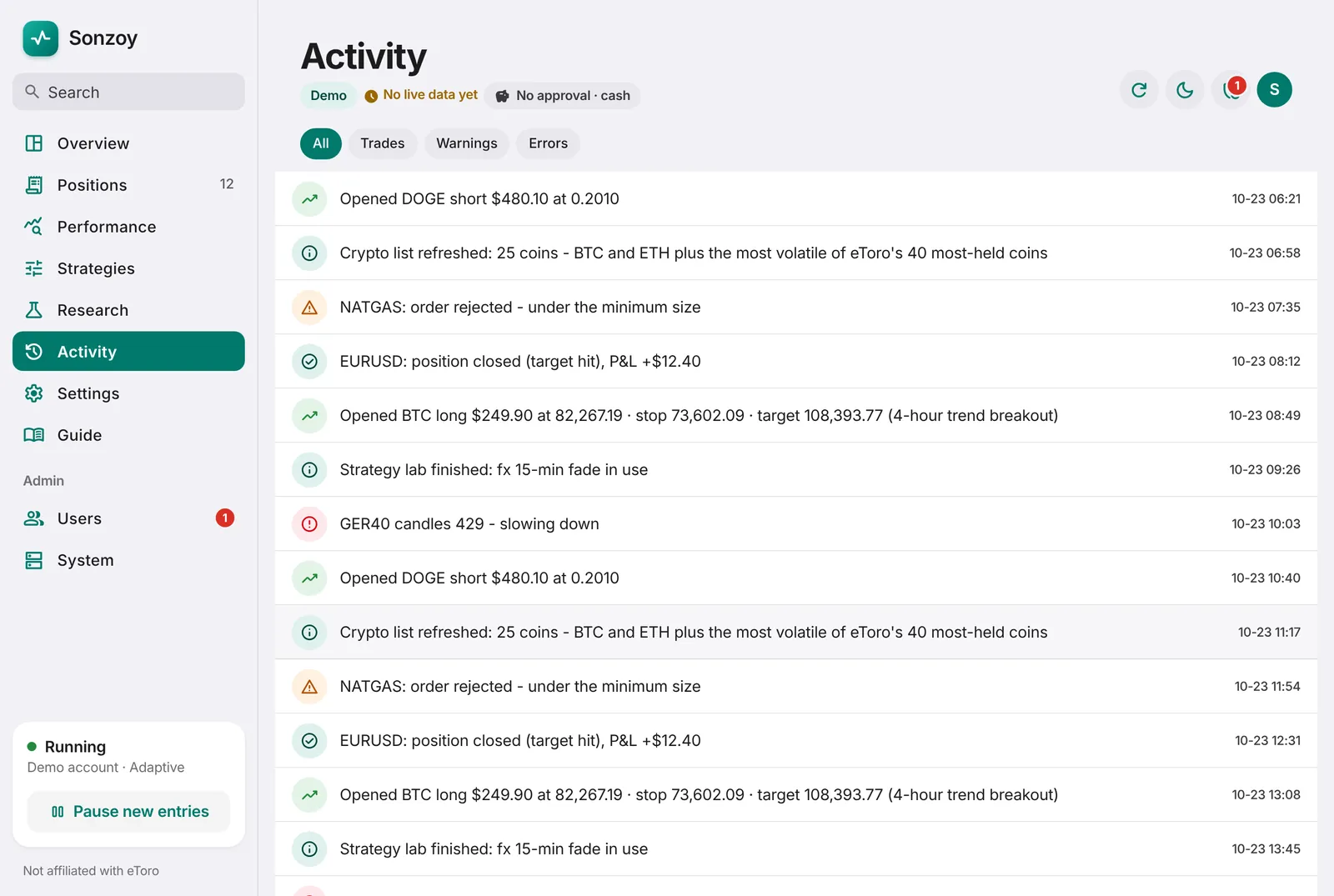
13. Strategies and activity
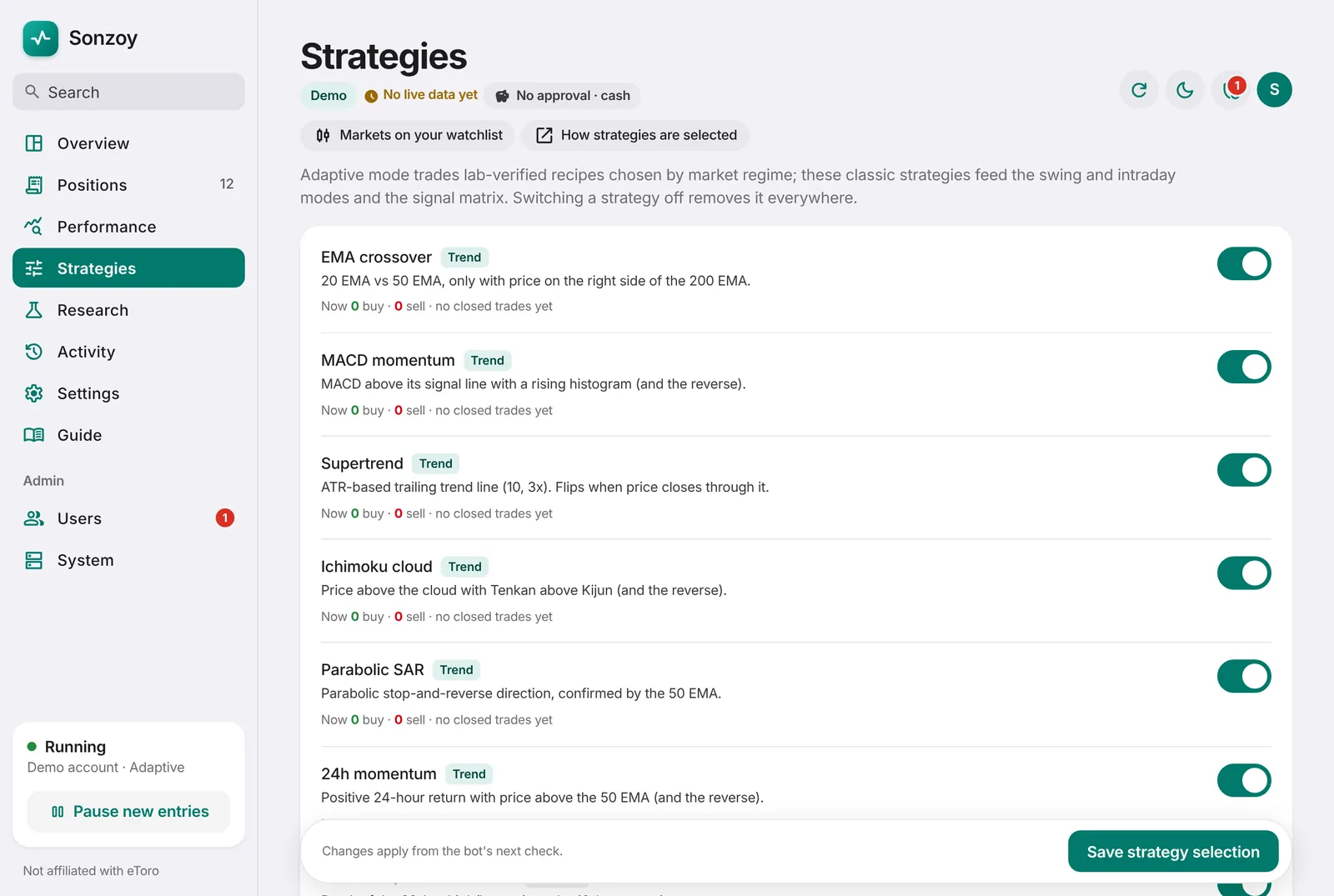
What each building block does, and a diary of everything the bot did.
14. Security
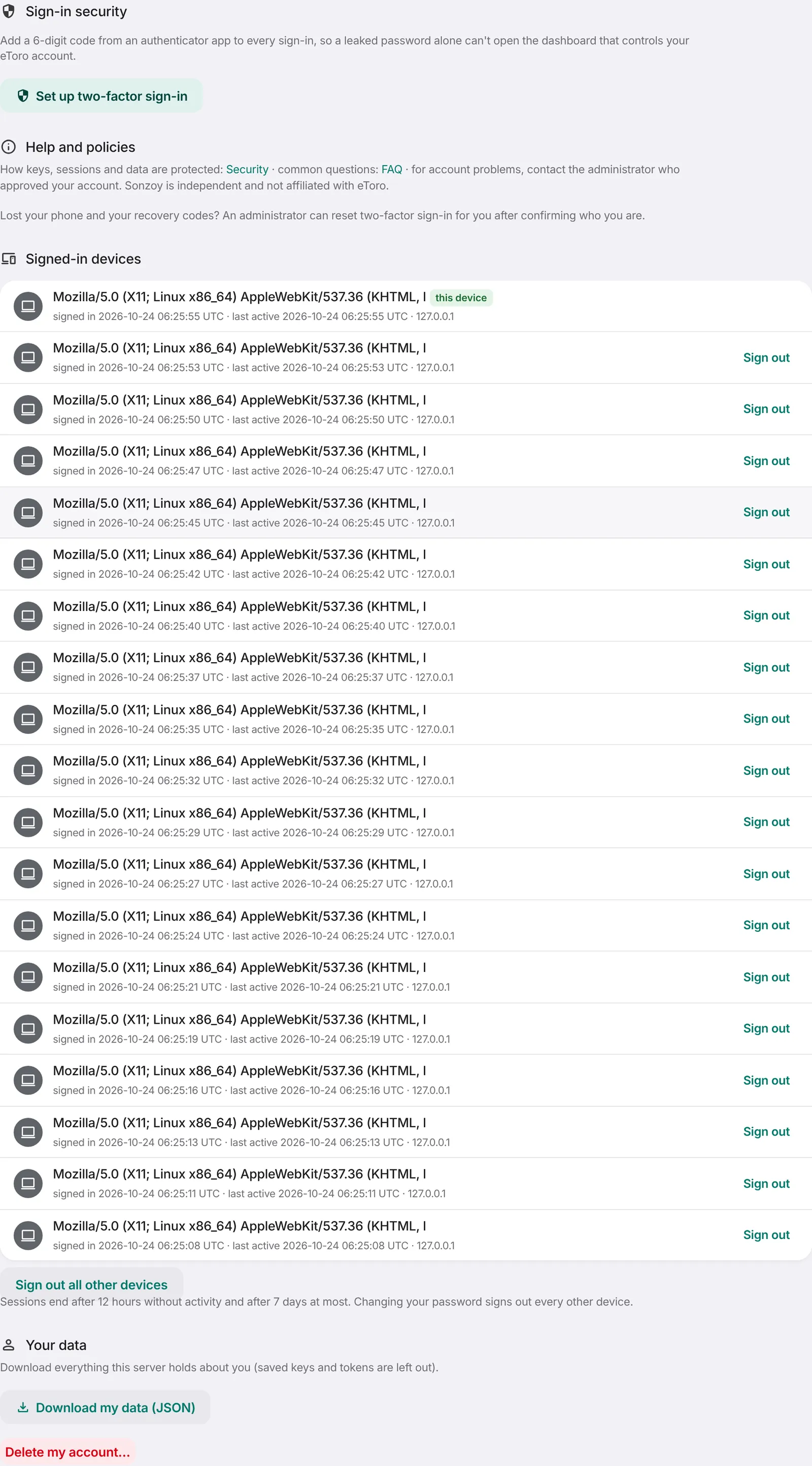
Protect your account.
- Turn on two-factor sign-in with an authenticator app (Google Authenticator, 1Password, Authy).
- Save the recovery codes somewhere safe. Each works once if you lose your phone.
- Review signed-in devices and sign out the ones you don't recognise.
Good to know: Real-money actions always ask for a fresh two-factor code.
Glossary
- Demo account
- Practice money on eToro. Same prices, no real gains or losses.
- Long / short
- Long profits if the price rises. Short profits if it falls.
- Stop-loss
- A price at which eToro closes a trade automatically to limit the loss.
- Take-profit (target)
- A price at which eToro closes a trade automatically to lock in the gain.
- Leverage (×5)
- Borrowed exposure: 5× makes gains and losses five times bigger. eToro charges an overnight fee for it.
- Spread
- The gap between eToro's buy and sell price. You pay it on every trade.
- Overnight fee
- A daily charge for leveraged or short positions held past the daily cut-off.
- Equity
- Budget plus everything won or lost so far, including open trades.
- Drawdown
- How far equity has fallen from its highest point.
- Win rate
- The share of trades that made money. Useful, but only together with how big the wins and losses are.
- Profit factor
- Total won divided by total lost. Above 1 means more was won than lost.
- ETF
- A fund you can buy like a share, for example one that holds the 500 biggest US companies (SPY).
- Core portfolio
- The part of the budget held long-term in ETFs, separate from active trading.
- Regime
- The current character of a market: trending, range-bound or turbulent.
- Strategy lab
- The weekly test of recipes on eToro's price history; only recipes that pass may trade.
- Slippage
- The difference between the price quoted when the bot decided and the price eToro filled.
Common questions
The bot is running but not trading. Why?
Usually because nothing is approved: the strategy lab kept the markets in cash, a market is closed, or a recipe's recent win rate fell below your minimum. Each market on the Markets page says why it is waiting.
What does 'awaiting eToro' mean?
An order was sent but eToro has not confirmed it yet. Sonzoy checks eToro's positions and never sends the order twice.
Will it touch trades I opened myself?
No. Sonzoy only manages positions it opened. Your own positions are shown as 'opened by you, not managed'.
Why did a position close?
Open History and tap the trade: the reason is written there (stop hit, target hit, swing exit, rebalance, or closed by you).
How do I stop everything quickly?
Press 'Pause new entries'. To also sell the bot's trades, use Positions → Close all and type CLOSE.
Can it guarantee profits or a 55% win rate?
No. The 55% rule decides what is allowed to trade, but markets change. Results can be negative, which is why demo comes first.